

A UPS alarm usually points to battery degradation, an inverter or rectifier fault, or another operating problem such as an overload or short circuit. Effective UPS failure alarm troubleshooting starts with the alarm code and the symptoms, not guesswork. VRLA UPS batteries typically last 3-5 years under normal conditions, and reduced runtime or swelling can signal that they’re wearing out.
An unexpected alarm can put critical equipment and your peace of mind at risk. The right clues can help narrow down the cause without opening the UPS or attempting unsafe repairs. This guide explains how to recognize battery warning signs safely, distinguish inverter and rectifier problems, and interpret common symptoms so you can understand what may be happening and when qualified attention is needed.
Key Takeaways
- Use changes in backup runtime, recurring alerts, and visible battery damage as clues, and keep safety first when assessing the UPS.
- Separate possible rectifier input problems from inverter output faults to narrow down where power delivery may be breaking down.
- Read alarm codes alongside the symptoms; an overload, short circuit, charger issue, or activated EPO can produce different warnings.
- Avoid opening or attempting internal repairs on an alarming UPS; recognizing when the fault needs qualified attention can help protect people and equipment.
1. Battery degradation symptoms and safety
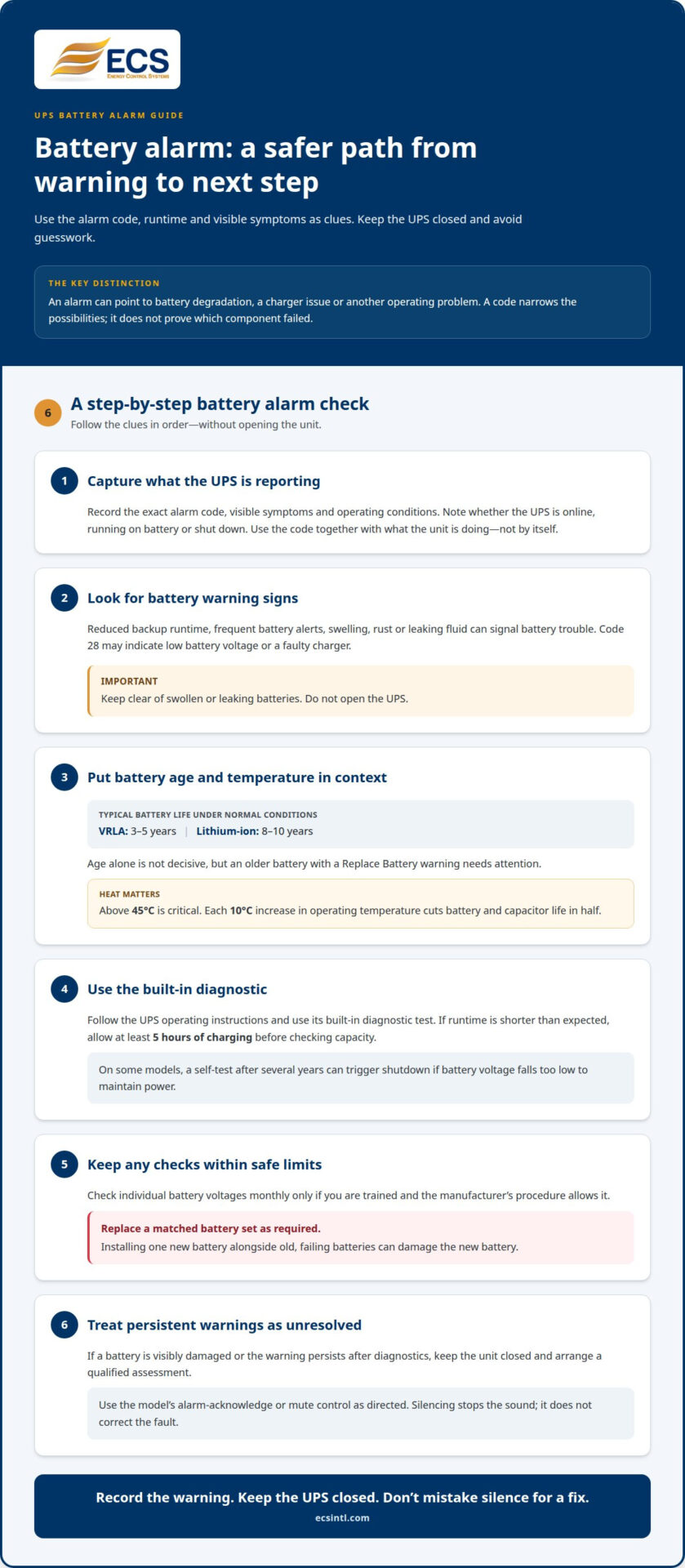
Reduced backup runtime, frequent battery alarms, swelling, rust, or leaking fluid can signal battery trouble. VRLA UPS batteries typically last 3-5 years under normal conditions; lithium-ion batteries can last 8-10 years. Age alone isn’t decisive, but an older battery with a Replace Battery warning needs attention.
Code 28 may indicate low battery voltage or a faulty charger. On some UPS models, a self-test after several years can trigger shutdown if battery voltage falls too low to maintain power. If runtime is shorter than expected, allow at least 5 hours of charging before checking capacity. A warm battery room also matters: temperatures above 45°C are critical, and each 10°C increase in operating temperature cuts battery and capacitor life in half.
For safer troubleshooting, record the alarm code and visible symptoms, then use the UPS’s built-in diagnostic test. Check individual battery voltages monthly only if you’re trained and the manufacturer’s procedure allows it. Replace a matched battery set as required. Installing one new battery alongside old, failing batteries can damage the new battery. Keep clear of swollen or leaking batteries, and don’t open the UPS.
To silence an alarm, use the model’s alarm-acknowledge or mute control as directed in its operating instructions. Silencing stops the sound, but it doesn’t correct the fault. Note the warning and address its cause.
Ignoring a failure alarm can leave connected equipment without reliable backup and may lead to a shutdown. Opening the UPS can cause physical harm or damage the equipment. If a battery is visibly damaged or the warning persists after diagnostics, keep the unit closed and arrange a qualified assessment.
2. Inverter and rectifier faults
The rectifier converts incoming AC power into DC power for the UPS. If it fails, the UPS may not receive the power it needs to operate. The inverter converts stored or rectified DC power back into AC for connected equipment. If it fails, the facility may lose the power the UPS should deliver. These symptoms point to different stages, so alarm codes and operating behavior matter.
Capacitors support stable power conversion, but age and wear can affect performance. DC bus ripple above 5% suggests capacitor degradation. A qualified technician can measure capacitance; replacement is recommended when it falls below 80% of its rated value. Capacitors should be replaced every five to seven years or at the intervals recommended by the OEM.
Some displays identify an internal fault with codes 01, 02, 03, 11, 12, 13, or 41. Code 2A indicates a short circuit on the charger output. Record the exact code and operating conditions. These identifiers help distinguish a charger or internal fault from a battery warning, but they don’t identify a failed component by themselves.
Site wiring can also cause input problems. Reversed line and neutral conductors may prevent the UPS from recognizing its input supply correctly. Have a qualified technician assess the site wiring and UPS input readings before concluding that the rectifier has failed. Don’t open the UPS to inspect internal components.
If alarms continue alongside suspected supply distortion, Harmonic Analysis can help clarify power-quality conditions affecting UPS operation.
3. Quick diagnosis of common UPS symptoms
Start by recording the display code, alarm pattern, and operating mode. A sound every 2 seconds can indicate an activated EPO function. Check the EPO status using the unit’s operating instructions; don’t bypass its controls. Note whether the UPS is online, on battery, or shut down. These details make UPS failure alarm troubleshooting more systematic.
For an overload alarm, code 43 indicates automatic shutdown because of an output overload. Follow the manual’s load-reduction and reset procedure. Remove noncritical equipment only when safe, then reassess the alarm. Code 49 indicates over input current, so don’t treat every current-related warning as an output overload. Check whether the warning appears with a change in connected load or input conditions.
Other codes point to distinct conditions. Code 14 indicates automatic shutdown because of an output short circuit. Code 27 may indicate battery voltage that’s too high or a faulty charger. Code 45 indicates no charger output and battery voltage below 10 V/PC. Record the code before taking action. It narrows the fault, but doesn’t prove which component failed.
Confirm that equipment is connected to a battery-backed outlet. Some UPS outlets provide surge protection only and won’t supply power during battery operation. If the display reports an internal fault, output short, or persistent warning, follow the model’s manual rather than repeatedly resetting the unit. A reset can clear a symptom without fixing its cause. For practical UPS failure alarm troubleshooting, consider the alarm code together with the operating conditions.
For recurring alarms or uncertain codes, get help reviewing UPS alarm symptoms before relying on the unit for backup power.
Energy Control Systems
Energy Control Systems can help assess UPS needs when alarms persist, the fault remains unclear, or power quality may be affecting operation. Uninterruptible Power Supplies (UPS) address backup-power needs, while Harmonic Analysis can assess power-quality conditions related to troublesome symptoms. These services are relevant when a recurring alarm points beyond a simple status reset or routine battery warning.
Bring the alarm code, symptoms, and timing to the conversation. That context helps focus the next step on the issue you’re trying to resolve, whether it concerns backup power or power quality. For a persistent fault, don’t rely on silencing the alarm as a fix.
Contact Energy Control Systems to discuss your UPS concern.
Make your next power decision with confidence
Turn the alarm into a clear next step. Document what your team observed, identify which equipment depends on the UPS, and use those details to guide decisions about power resilience. A consistent approach to ups failure alarm troubleshooting can help your team respond purposefully instead of reacting to each warning in isolation.
When the issue raises broader questions about backup-power needs or power quality, Energy Control Systems can help you consider relevant options. Advanced surge protection and industrial power conditioning equipment are among the reliable solutions available.
Take the next step toward a more informed power plan. Contact Energy Control Systems for UPS support and discuss the concern affecting your operation.
Frequently Asked Questions
What Are the Most Common UPS Problems and Their Solutions?
Battery warnings, charger faults, overloads, and internal component faults are common UPS problems. Match the displayed code with the symptom before choosing a response. For example, code 27 can indicate battery voltage that’s too high or a faulty charger, while code 45 indicates no charger output and battery voltage below 10 V/PC. Persistent internal faults need qualified assessment.
Why Is My UPS Beeping?
A UPS beeps to signal a condition that needs attention, such as a change in operating status or a fault. Check its display and operating mode first, then compare the alarm with the manual for that model. Note whether the sound began during a power interruption, after equipment was added, or alongside a warning light. The beep alone doesn’t identify the cause.
What do common UPS failure alarm codes and warning lights mean?
Codes and lights identify UPS conditions, but their meanings depend on the unit’s display and documentation. Code 27 can point to high battery voltage or a charger fault. Code 45 indicates no charger output and battery voltage below 10 V/PC. Record the exact code and any illuminated warning indicators together, so the symptoms can be interpreted as a set.
How do I troubleshoot a UPS that is beeping continuously?
Read the display before attempting a reset. Record the active alarm, operating mode, and any recent change to the connected equipment or input supply. Compare those details with the specific UPS manual and follow its instructions. If the display reports an internal fault or the alarm remains after the documented steps, stop resetting the unit and arrange a qualified assessment.
What should I check when a UPS reports battery failure or replace battery?
Check the UPS’s diagnostic result, battery condition, and maintenance history. A quarterly battery impedance test can help track changes over time. If the Replace Battery warning persists, record the reading and alarm code. A charger issue can also affect battery-voltage warnings. Don’t assume the battery alone is responsible until you’ve considered the diagnostic information.

Article by
Jeff Edwards
Founder of ECS International Inc. Edwards travels and speaks extensively in Latin America, Asia and Africa on the subject of power quality; transients and mitigating their impact on profitability. After graduating from Texas Tech University in Lubbock Texas, Edwards spent 9 years in the Telecommunications sector prior to founding Energy Control Systems in 1987 as a Texas based corporation selling surge suppression and UPS systems. The company has evolved into a global power quality products and energy efficiency concern with operations spanning South America, Asia, Europe and Africa.
Disclaimer
Some of the above information may be the opinion of the author.